

Siemens Designcenter Solid Edge 2026 Delivers Productivity and Immersive Design
Designcenter Solid Edge 2026 delivers next-generation design productivity with powerful AI tools, immersive visualization and flexible cloud solutions to help you work smarter and faster. Highlights include AI-driven commands like Magnetic Snap Assembly, Automatic Drawing creation and the in-app Copilot in Designcenter X Solid Edge, plus immersive design review with the new Walkthrough command.
Enhanced sheet metal, drafting and part modeling features streamline manufacturing workflows and improve precision. With expanded value-based licensing options and seamless data interoperability, Designcenter Solid Edge 2026 gives you the freedom to scale capabilities, collaborate globally and design at the pace of innovation.
Designcenter X Solid Edge delivers the full power of Designcenter Solid Edge in a secure, SaaS environment. Install anywhere, enjoy automatic updates and manage CAD with no extra IT overhead. Built-in cloud data management powered by Teamcenter X keeps designs organized, accessible and secure – with revision control, check-in/check-out and release workflows included. Teams can visualize, mark up and discuss designs in real time. Plus, powerful AI features – everything from Magnetic Snap Assembly to the in-app Design Copilot – help you stay focused and productive.
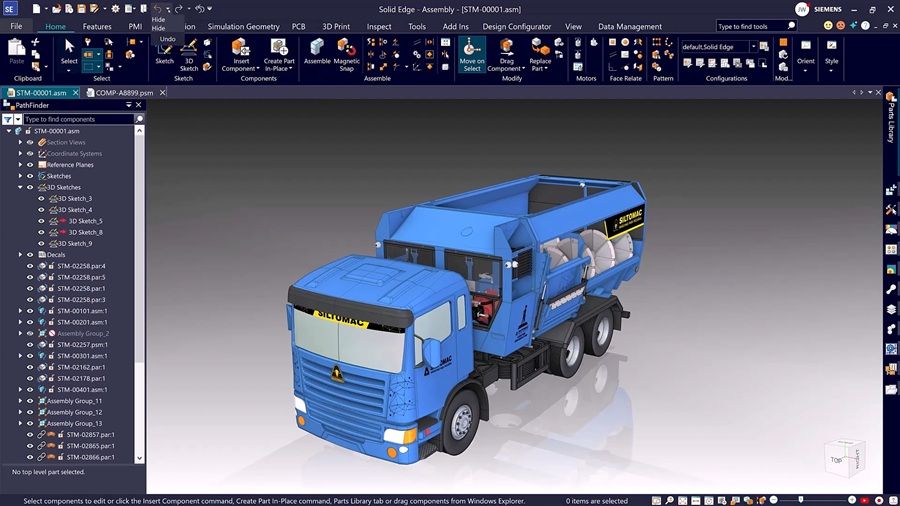
Solid Edge 2026 puts Artificial Intelligence (AI) to work where you need it most – saving you time, clicks – keeping your designs moving forward. Snap together assemblies in seconds with Magnetic Snap Assembly, which automatically detects the right constraints so you don’t have to. Let the new Automatic Drawing tool automate drawing creation so you can spend more time designing and less time documenting. And when you need help, the AI-powered Design Copilot in Designcenter X Solid Edge can offer real-time answers, tips and guidance to keep you moving forward – no interruptions, no guesswork.
Managing complex assemblies just got easier. Create multiple display configurations without duplicating files, so you can quickly switch views for design reviews or documentation. Enhanced part copy tools make it simple to reuse geometry with precision, while new explode view options help break down assemblies for better communication and planning. These upgrades give you greater flexibility and control – helping you work faster and more effectively from concept to completion.
From modeling precision parts to preparing sheet metal for manufacturing, new enhancements help you design with speed and confidence. Create interlocking joints in seconds using tab-and-slot automation. Quickly generate thin-walled features with integrated wall thickness controls across major modeling commands. Expanded etching support and smarter flange trimming simplify detailing and improve manufacturability. And with the new Fill Pattern tool, you can apply repeating features to surfaces effortlessly – whether you’re simulating textures or reducing weight.